In this section, you manage contracts that define response times and service levels for ticket handling. Contracts form the basis of SLA management and specify the timeframes within which tickets must be responded to, on-site visits must be conducted, or service restoration must be achieved.
Contracts can be used on a process-specific basis and depending on priorities. In particular, time targets for response, on-site arrival, and recovery can be defined. Each time target consists of an actual target time as well as up to three escalation times. These escalation levels allow reminders or escalations to be triggered before a deadline is reached.
To calculate the time targets, the system does not use simple calendar days, but rather the stored working or service hours. Additionally, contracts can be assigned to organizational units and, within the framework of service orientation, to business services as well. As a result, the appropriate SLA requirements are automatically taken into account during ticket processing.
The overview displays all existing contracts in a concise list format. It shows basic contract information such as type, name, and status.
In addition, the section includes a brief description of how contracts are used. It explains that contracts can represent different contract types, such as SLAs, and that response, on-site dispatch, and recovery time objectives are defined.
The overview thus serves both for the centralized management of existing contracts and for a quick overview of their technical use and basic configuration.

In the detail view, you can maintain the content and time-related specifications of a contract.
The sidebar is used to define the basic properties of the contract. These include the contract type, the assigned service calendar, and the processes to which the contract applies.
The “General” tab is used to maintain general contract data. Here, you can enter the contract title and description.
In the “Time Targets” section, you manage the SLA targets for each process. The time targets are calculated based on the stored work time calendars. Additionally, different time targets can be defined depending on the ticket process and priority.
The time targets are used to control ticket processing and are utilized in the ticket context to monitor deadlines and escalations.
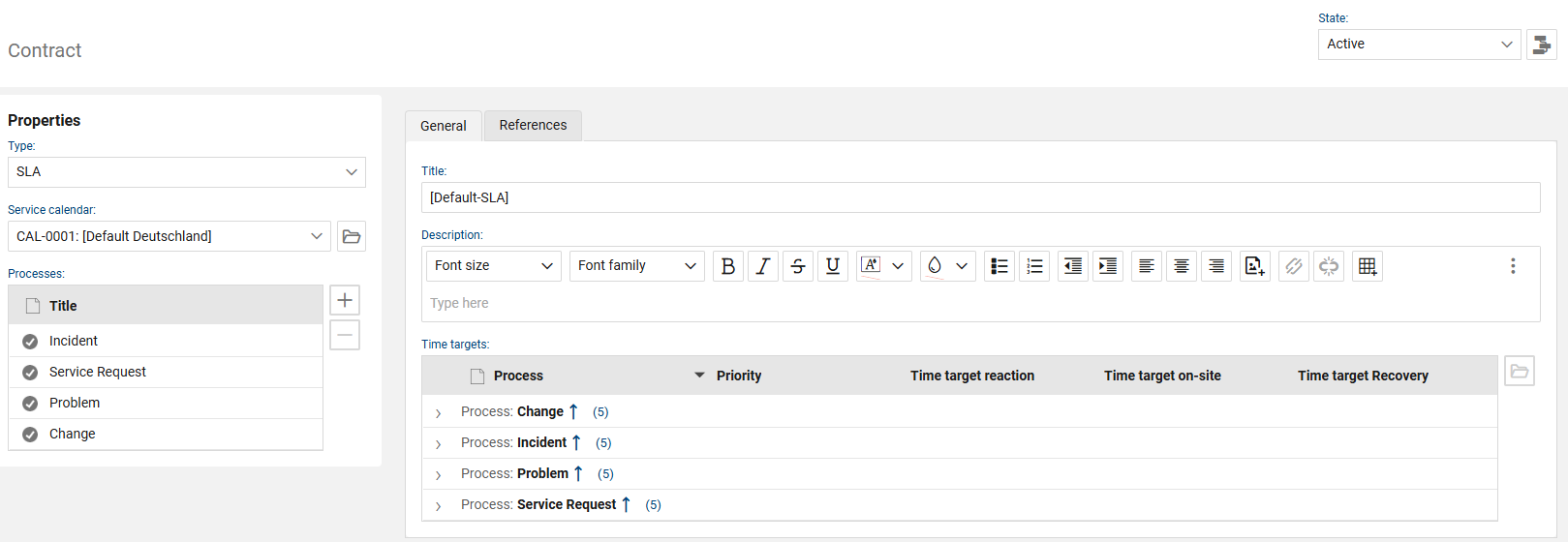
The following fields and functions are available for each contract:
“General” tab
•Status: Displays the current status of the contract. Only SLA contracts set to Active are taken into account for ticket calculations
•Type: Specifies the contract type. In the context of contracts, the SLA type is used in particular to define response and resolution times for ticket processing
•Service Calendar: Specifies which work schedule is used to calculate time targets. Working time calendars are used in SLA contracts so that SLA times are calculated only within actual working hours.
•Processes: Shows the processes to which the contract applies. Time targets can be defined on a per-process basis so that different ticket types are processed according to appropriate specifications.
•Title: Contains the name of the contract.
•Description: Provides additional details about the contract.
•Time Targets: This section is used to maintain the contract’s SLA specifications. An SLA contract allows you to define specified response and resolution times.
•Process: Indicates the process to which the respective time target definition applies.
•Priority: Specifies the priority level to which the respective time target applies.
•Response Time Target: Defines the time target for the initial response to a ticket. An SLA agreement allows for the specification of predefined response times
•On-Site Time Target: Defines the time target for an on-site visit. If the SLA includes an on-site response time target, this can also be manually stopped within the ticket context
•Resolution time target: Defines the target time for resolving the ticket. An SLA agreement allows for the specification of predefined resolution times
“References” tab
This tab displays the objects to which the contract is assigned. SLA contracts can be assigned to organizational units and, in the context of service orientation, to services or CIs.
Affiliated companies
This section displays the companies or organizational units to which the contract is assigned.
•Title: Displays the name of the assigned company or organizational unit.
•Customer No.: Contains the customer number of the assigned company or organizational unit.
Associated Services
This section displays the services or CIs to which the contract is assigned.
•Unique ID: Contains the unique identifier of the associated service object.
•Asset Type: Specifies the type of the associated object. For the “Business Service” asset type, an additional “Contract” section is displayed, which contains the associated SLA contract.
•Title: Displays the name of the associated service.
•Host Name: Displays the host name of the associated service, provided it is maintained for the object.
•Status: Displays the current status of the associated service.
•Criticality: Displays the criticality of the associated service. Service orientation and SLA assignment are used to take the relevant service specifications into account for linked tickets