The Knowledge Base Wizard is designed to provide interactive step-by-step guides for the Self-Service Portal. Unlike traditional knowledge base articles, which immediately present users with a ready-made solution, a wizard guides users through a predefined series of questions and answers. This allows a problem to be narrowed down more precisely before specific assistance is provided.
The Knowledge Base Wizard is particularly well-suited for recurring standard issues where a clear decision path can be mapped out. These include, for example, typical malfunctions, common operational questions, or simple service requests.
Users are first guided through categories and topics and then led through a structured questionnaire. Depending on the answers provided, the system displays either further questions or a relevant knowledge base entry.
The major advantage of this feature is that knowledge is provided not just as static text, but as a guided solution path. This means users do not have to decide for themselves which article might be helpful; instead, they are guided step by step through the problem-solving process. As a result, self-help within the portal becomes more understandable and targeted.
This form of knowledge sharing is particularly well-suited for topics with multiple possible causes or that require follow-up questions. The Knowledge Base Wizard supports both simple checklists and more complex question trees with branching answers.
In addition, the Knowledge Base Wizard links self-help directly to ticket creation. If no suitable solution is found despite the guided instructions, a ticket can be created directly from within the Wizard.
The questions and answers already addressed are automatically documented in the ticket. This provides the agent with important additional information about the solution process to date as soon as the ticket is received. This reduces the need for follow-up questions and speeds up processing.
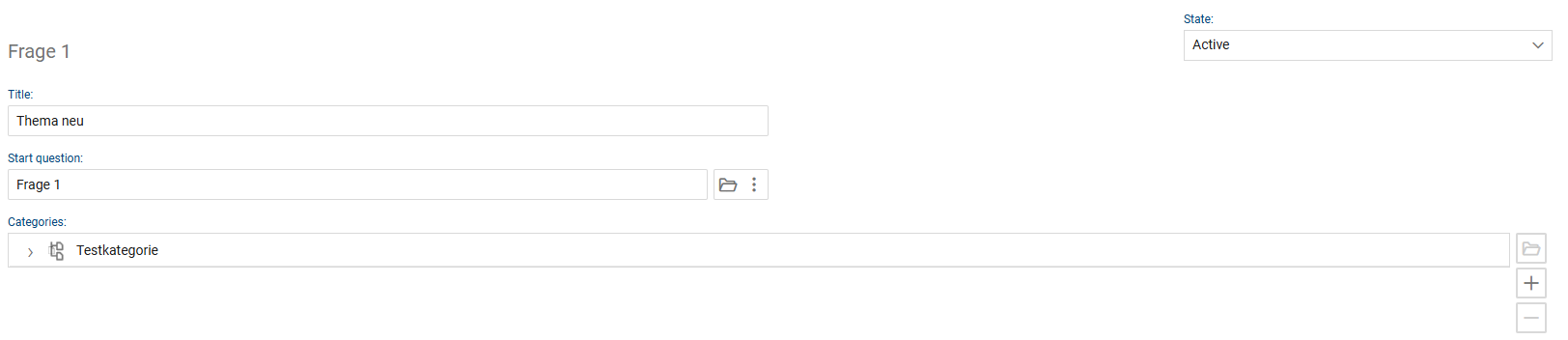
In this area, administrators maintain the content foundation of the wizards. Here, topics are created, initial questions are defined, and appropriate categories are assigned. The guided dialogue in the Self-Service Portal is later generated based on this information.
The interface is not intended for use by end users, but rather for the structured management and maintenance of self-help content.
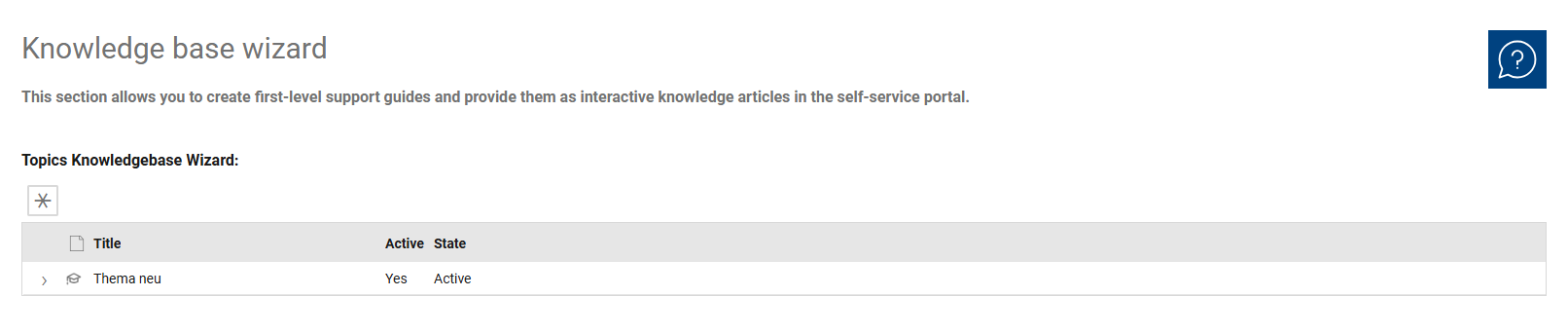
The Knowledge Base Wizard overview is used to manage all existing topics. It serves as the central entry point for administration and helps you quickly view existing Wizard topics, compare them, and open them for further editing.
Unlike the detail view, the focus here is not on the content settings of an individual topic, but rather on the overall administrative overview of all existing entries. This makes the view particularly suitable for maintaining, monitoring, and organizing the existing Wizard structure.
The most important administrative information is displayed for each topic. This includes, in particular, “Title,” “Active,” and “Status.” The overview is thus intentionally kept compact and focuses on the information relevant for quickly classifying a topic.
This allows administrators to immediately see how a topic is named, whether it is currently active, and what its status is. Especially when dealing with a large number of self-help guides, this streamlined display simplifies the management and maintenance of existing topics.
Additionally, the overview includes a function for creating new topics. The overview thus serves as a central workspace for the organizational management of the Wizards knowledge base before individual topics are edited in the detail view.
The following fields and functions are available for each topic:
•Title: This field is used to enter the name of the topic. The title should clearly and concisely describe the content of the self-help guide so that the topic can be easily identified in the system and properly categorized later in the self-service portal.
•Opening Question: This field determines the question with which the wizard begins. It serves as the entry point to the structured question-and-answer dialogue and thus forms the technical foundation for the rest of the self-help guide.
•Categories: This section manages the categories to which the topic is assigned. Categorization is important because users in the self-service portal first access the solution search via categories and then select appropriate topics. Categories thus help to group topics by subject matter and logically structure the entry into the wizard.