Service orientation makes it possible to manage services in the system as separate asset types, bundle them into a service portfolio, and make them available specifically to organizations or organizational units.
In addition, services can be linked to an SLA contract. This allows the relevant service to be specifically taken into account for SLA management when processing tickets, rather than relying solely on the organizational assignment of the person involved.
As part of the service-oriented approach, a link is established to business services, allowing the time targets for a ticket to be calculated based on the assigned service. For the “Business Service” asset type, the “Contract” section is also available, where the assigned SLA contract for the respective asset or configuration item is displayed.
When a ticket is linked to an affected asset, the system checks whether an SLA contract exists for that asset. If multiple SLA specifications are available, the system uses the SLA with the most critical time specifications for processing the ticket.
Service orientation is managed centrally in the overview. There, existing services in the service portfolio are managed, activated processes are defined, and associated service consumers are maintained.
To use service orientation, a new business service is first created as an asset in the service portfolio. It is then linked to at least one organization or organizational unit and assigned to an SLA contract. Additionally, service orientation must be activated for the relevant ticket types, and the service must be set to “Active.”
If a relevant service is then selected in a ticket, its SLA contract applies instead of the organizational unit’s SLA contract. For the affected person, the SLA of the assigned or top-level organizational unit remains applicable.
When service orientation is enabled, the “Service” field can also be displayed in the ticket. This allows the relevant service to be selected directly. The selected service may have a different SLA contract than the affected person or the assigned organizational unit.
The “Service” field can also be used independently of affected assets to specify the relevant service directly in the ticket.
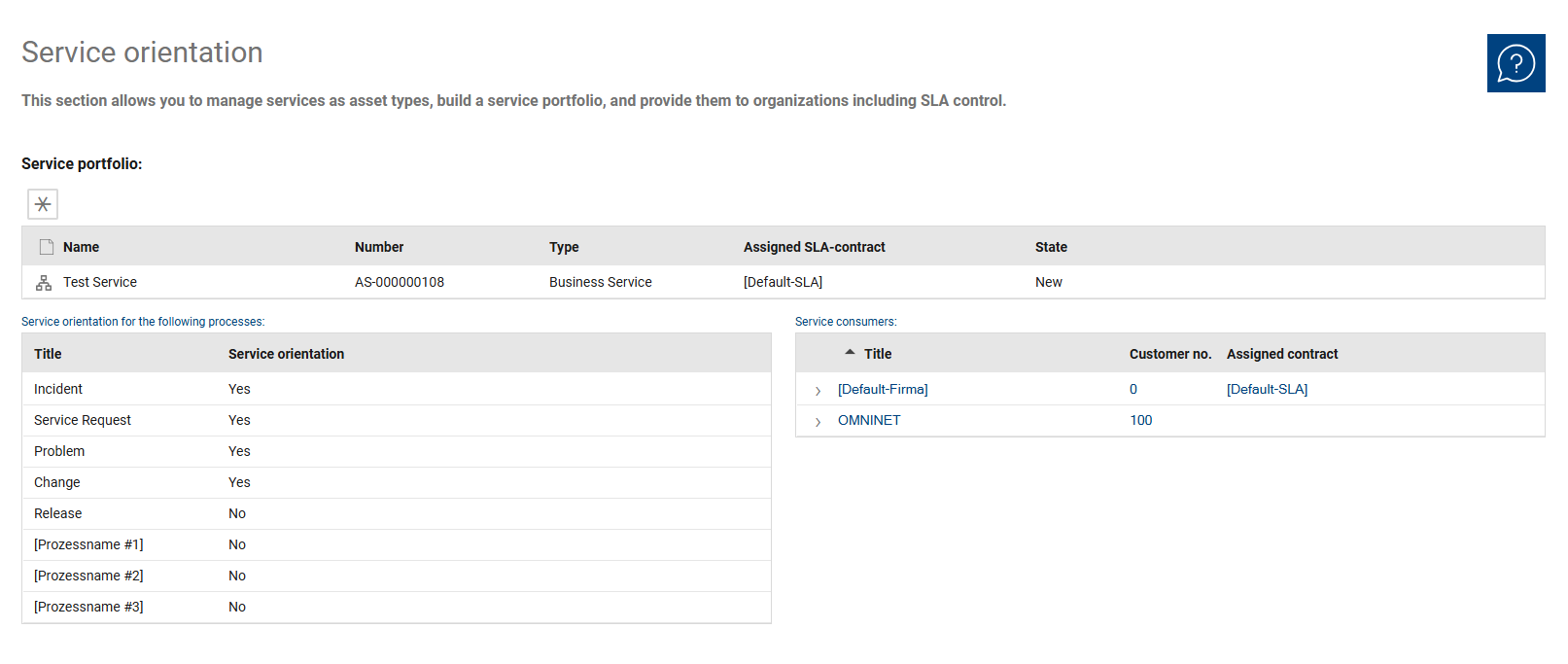
The overview consolidates all information relevant to service orientation into several sections.
The service portfolio serves as the central section for managing the services that have been created. It is where existing services are managed, along with their key details and the associated SLA agreement. Each entry in the service portfolio represents a service that has been made available.
In addition, two tables are available that map process-related activation and the assigned service consumers.
The “Service Orientation for the Following Processes” table is used to specify for which processes or ticket types service orientation is activated.
The “Service Consumers” table shows for which organizations or organizational units a service is provided. Additionally, information such as customer number and assigned contract is displayed there.
The following fields and functions are available for each entry in the service portfolio:
•Name: Displays the name of the created service.
•Number: Contains the unique identifier of the service.
•Type: Specifies the type of the entry. The type identifies the nature of the service entry, such as a business service. The documentation describes business services as services that can be linked to SLA contracts within a service-oriented framework.
•Assigned SLA Contract: Displays the SLA contract assigned to the service. For business services, it is documented that the assigned contract is listed in the additional “Contract” section and is valid for the respective asset or CI.
•Status: Displays the current status of the service. The status indicates the current processing or lifecycle status of the service.
The following fields and functions are available for each entry in Service Orientation for the following processes:
•Title: Displays the name of the respective process or ticket type, such as Incident, Service Request, Problem, Change, or Release.
•Service Orientation: Indicates whether service orientation is enabled for the respective process. This field indicates whether service orientation is enabled for the respective process.
The following fields and functions are available for each entry in Service Consumers:
•Title: Displays the assigned organization or organizational unit.
•Customer No.: Contains the customer number of the respective organization or organizational unit.
•Assigned Contract: Displays the contract assigned to the respective organization or organizational unit.