Default responsibilities are used to automatically assign responsible groups to tickets. In this section, you define the rules the system uses to determine the appropriate group responsible for a ticket.
The assignment can be based on technical characteristics of the ticket or the person involved. The criteria available for this are “Process,” “Category,” “Location,” and “Organizational Unit.” A default responsible group is always assigned to tickets. Additionally, an external default contact can be optionally specified to whom a ticket should be forwarded via email if necessary. This allows responsibilities to be managed in a consistent, traceable, and as automated a manner as possible.
The rules can be general or very specific. A rule can contain a single criterion or combine multiple criteria. The system checks the existing rules in the specified order from top to bottom.
Within a rule, the determining values are evaluated in the order “Process,” “Category,” “Location,” and “Organizational Unit.” General rules can thus apply to many cases, while more specific rules apply specifically to certain scenarios.
Empty values in a rule apply to all corresponding values in the ticket. If a specific value is not set in a ticket, the system considers only those rules that also do not contain a value in that field. Based on this, the system automatically determines the most appropriate rule. If no rule applies, the default group “Ticket User” is used.
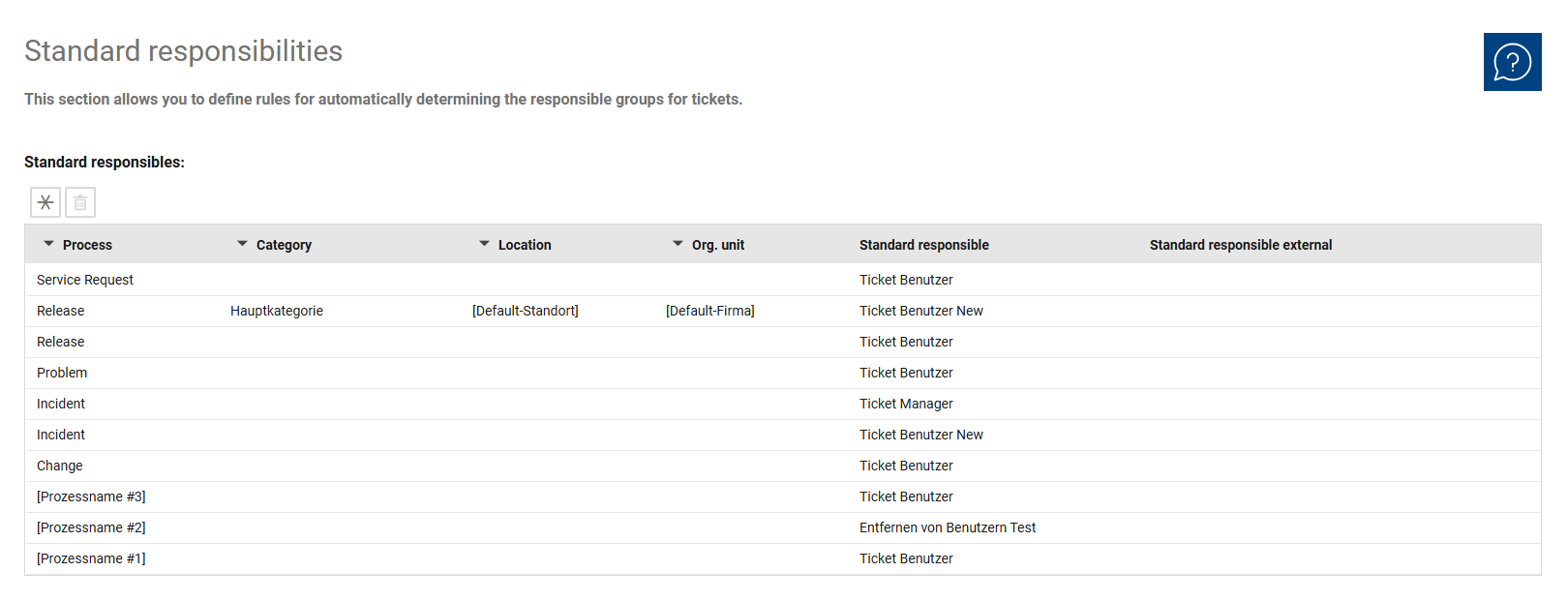
The overview is used for the centralized management of all rules for automatically determining responsible groups. Here, you can maintain existing assignments, set their order, and modify or add rules as needed.
Since the rules are checked sequentially, not only the content of a rule is important, but also its position within the list. The overview helps you coordinate general and specific rules in a meaningful way. This allows you to manage both standard cases and deviating responsibilities for specific processes, categories, locations, or organizational units.
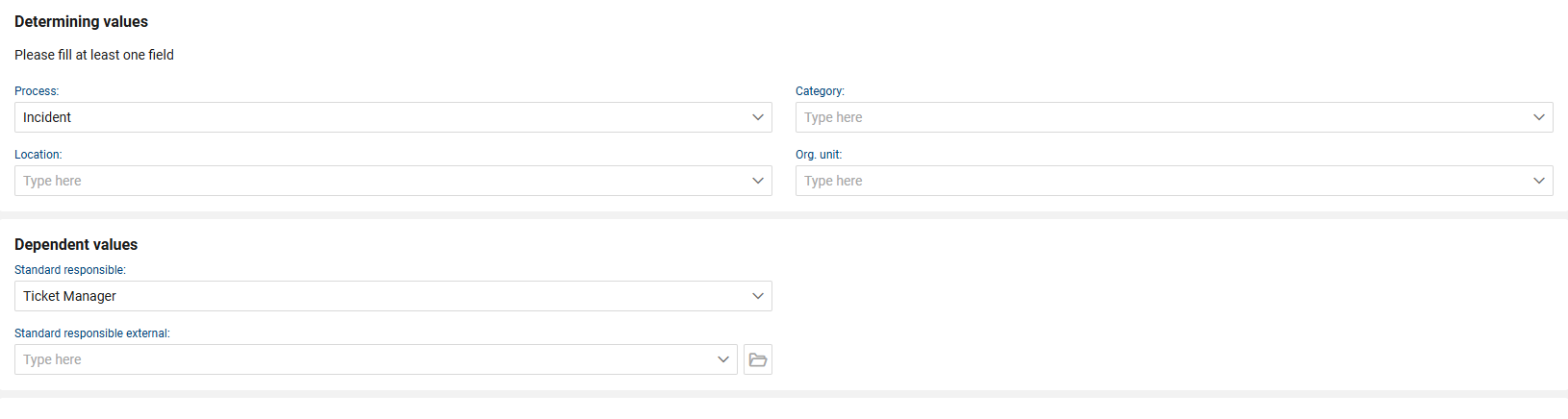
In the detailed view of a rule, you define the criteria for automatic assignment and the resulting values. Here, you determine the business conditions under which a specific responsible group should be assigned.
The rule is divided into determining values and dependent values. The determining values include “Process,” “Category,” “Location,” and “Organizational Unit.” Based on this information, the system determines which standard responsible party—and, if applicable, which external standard responsible party—is used.
At least one of the determining fields must be filled in. However, a rule does not have to include all criteria. If only some fields are filled in, the rule applies to all remaining cases that are not restricted. This allows you to map both general standard responsibilities and specific restricted special cases.
The following fields and functions are available for each rule:
•Process: Specifies the process or ticket type to which the rule applies. This field is evaluated as the first criterion within the rule. If no process is specified, the rule can be applied across all processes.
•Category: Determines the ticket category to which the rule applies. The category is checked after the process and allows for a more precise functional definition of responsibility.
•Location: Defines the location of the person concerned as an assignment criterion. This allows the responsible group to be determined based on the ticket’s geographical context.
•Organizational Unit: Specifies the organizational unit to which the person concerned belongs. This criterion serves to further refine the assignment.
•Default Assignee: Specifies the responsible group that is automatically entered into the ticket when the rule applies.
•Default External Assignee: Optionally specifies an external default assignee. This value can be used if a ticket needs to be forwarded via email to an external party.